Your Own Element
Implement Element for something the library does not have.
The example for this page builds as tutorial_11_your_own_element.
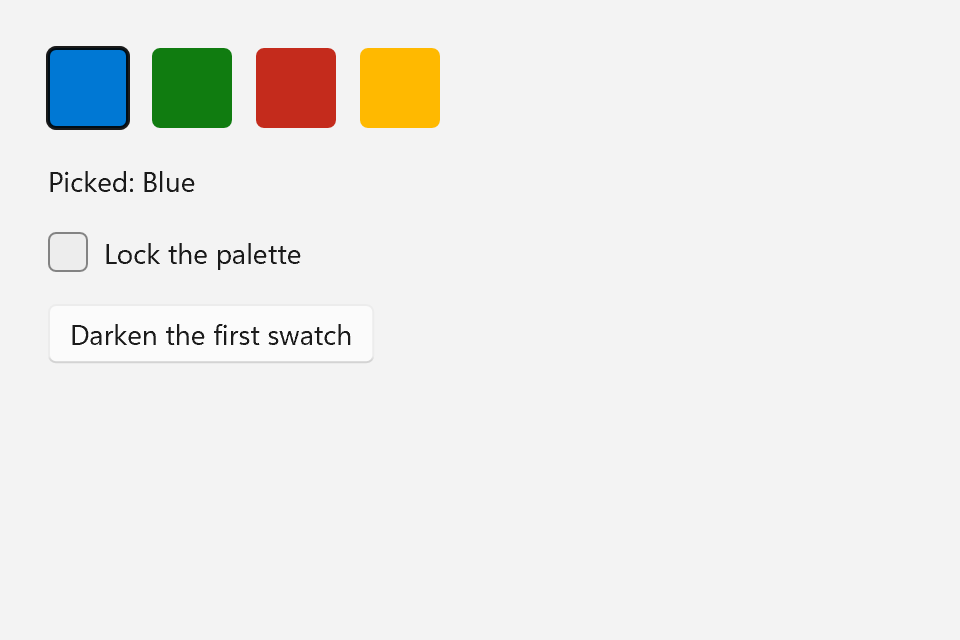
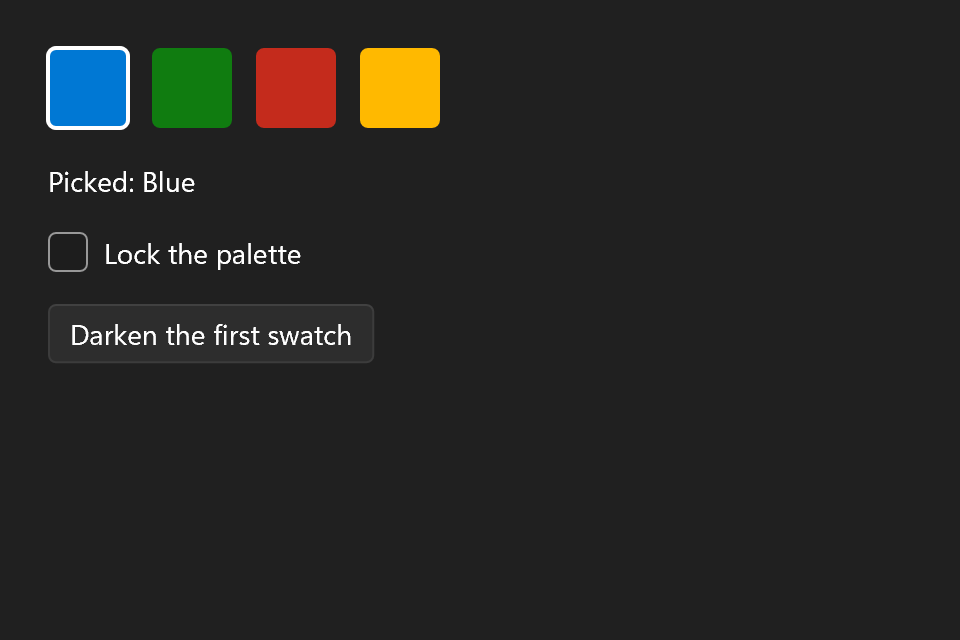
The example is a color swatch: a 40 by 40 rounded square that can be clicked, focused with Tab, activated with Space or Enter, shows a ring when selected, fades when disabled, shows its color code on a right-click, and tells a screen reader it is a button. Four of them make a small palette. The full source is examples/tutorials/11_your_own_element/main.cpp.
What Element Requires
ui::Element is the one base class every node in the tree derives from. Two of its hooks are required, and you override the rest when your element needs them.
The rule for the names is short: you call a verb, and you override <verb>_override. The public verbs (measure(), arrange(), render(), tick(), handle_pointer(), handle_key(), ...) do what every element shares, such as margin, explicit and min/max size, alignment, visibility, the requested theme, transforms, opacity and the focus ring. Then they call the protected hook with what is left:
| Hook | Required | What it does |
|---|---|---|
measure_override(available, context) |
Yes | Returns the size the element wants. available has the margin already taken off; ui::Unbounded (+infinity) on an axis means unbounded, 0 means no room, and the answer must be finite. context holds the text measurer and the theme. const: measuring changes nothing. |
render_override(renderer, context) |
Yes | Draws the element through renderer, in window coordinates. bounds() is where it was arranged, and context.theme is the theme to draw it in. |
arrange_override(rect, context) |
No | Positions children. The base class has already set bounds(), so a leaf leaves this alone. |
pointer_override(e) |
No | Mouse, touch and pen input, already mapped through any transform. Returns whether it handled the event. |
wheel_override(e) |
No | Wheel turns. Returns whether the element scrolled. |
key_override(e) |
No | Key presses and releases while the element, or something inside it, has focus. Returns whether it handled the key. |
text_override(e) |
No | Typed text, for elements that edit text. Returns whether it took the text. |
tick_override(delta) |
No | Runs on every frame the window ticks, for time-driven drawing. request_tick() keeps the window ticking while the element waits for time to pass. |
[[nodiscard]] ui::Size measure_override(ui::Size, const ui::MeasureContext&) const override
{
    return {40.0f, 40.0f};
}

void render_override(ui::Renderer& renderer, const ui::RenderContext& context) const override
{
    const ui::Theme& theme = context.theme;
    // A disabled swatch (its own flag or an ancestor's) fades, as built-in controls do.
    const ui::Color fill = is_enabled() ? color_ : color_.with_alpha(color_.a * 0.4f);
    renderer.fill_rounded_rect(bounds(), theme.corner_radius, fill);
    if (selected_)
    {
        renderer.stroke_rounded_rect(bounds(), theme.corner_radius, theme.colors().text, 2.0f);
    }
}

bool pointer_override(const ui::PointerEvent& e) override
{
    if (e.action == ui::PointerAction::Down && e.button == ui::PointerButton::Right)
    {
        show_details();
        return true;
    }
    if (e.button != ui::PointerButton::Left)
    {
        return false;
    }
    if (e.action == ui::PointerAction::Down)
    {
        pointer_down_ = true; // a handled press holds the pointer until it is released
        return true;
    }
    if (e.action == ui::PointerAction::Up)
    {
        const bool was_down = pointer_down_;
        pointer_down_       = false;
        if (was_down && bounds().contains(e.position))
        {
            click();
        }
        return true;
    }
    return false;
}
Three details in there to copy:
render_override()draws only through theRendererit is given. That is the whole trick behind testing without a window: the renderer may be Direct2D, or it may be a recorder.- The colors come from
context.theme.theme.colors()holds the role colors every theme fills (text,background,accent,control_fill,divider,focus, ...), so the swatch's ring follows light, dark, high contrast and every era without a line of its own. is_enabled()is false when the element or any ancestor is disabled. The swatch fades then. The window already keeps a disabled element out of the tab ring and away from input.
Pointer Input
Pointer input is routed. The window finds the topmost element under the pointer and calls its pointer_override(). If that returns false, the event goes on to its parent, and so on up to the root. Returning true stops it there.
A press that an element handles captures the pointer: the moves and the release go to the same elements until the button is let go, wherever the pointer is. That is why the swatch can check on release whether the pointer is still over it, and why dragging off before letting go cancels the click, the way Button does it. capture_pointer() and release_pointer() narrow or end that capture early, for a drag that hands the pointer over to a part. An element that loses the capture gets a Leave.
The wheel is routed the same way through wheel_override(). Return true only when the element scrolled, so an outer scroller takes over at the end.
Dirty Flags and VisualId
An element never repaints itself. When its state changes, it says what kind of change that was, and the window decides what to do about it:
[[nodiscard]] ui::Color color() const
{
    return color_;
}
void set_color(ui::Color color)
{
    if (color == color_)
    {
        return;
    }
    color_ = color;
    mark_dirty(ui::DirtyFlags::Visual);
}
void set_selected(bool selected)
{
    if (selected == selected_)
    {
        return;
    }
    selected_ = selected;
    mark_dirty(ui::DirtyFlags::Visual);
}
void on_click(ui::Callback<void()> handler)
{
    on_click_ = std::move(handler);
}
mark_dirty() takes one or more ui::DirtyFlags:
| Flag | Meaning | Use it when |
|---|---|---|
Measure |
The desired size must be recomputed, and so the arrangement too. | Anything that can change measure_override()'s answer: text, font, padding, number of children. |
Arrange |
The element's or its children's place changed, its desired size did not. | Moving children inside the same size, such as scrolling content in a fixed viewport. |
Visual |
The appearance changed, the size and place did not. | Color, selection, hover, focus. |
Layout |
Measure and Arrange together. |
What a size-affecting setter marks. |
The flag bubbles up the parent chain to the window and stops at the first ancestor that already has it, so a burst of changes costs a few pointer hops, not a tree walk. Mark exactly what changed. A color change marked Measure still works, but it makes the window measure and arrange everything above you for nothing.
Compare before assigning, as set_color() does. It is the same equality gate Property<T> has, and it keeps a bound setter that receives the same value twice from causing any work at all.
Every element also has a visual_id(), a VisualId assigned once at construction and never reused. You rarely touch it yourself. It is why an element is not copyable, and why it may only be moved before it has a parent.
A Minimal Custom Element
The whole class:
class SwatchControl final : public ui::Element, private ui::InvokeProvider
{
public:
    SwatchControl(ui::Color color, std::string name) : color_(color), name_(std::move(name))
    {
    }

    [[nodiscard]] ui::Color color() const
    {
        return color_;
    }
    void set_color(ui::Color color)
    {
        if (color == color_)
        {
            return;
        }
        color_ = color;
        mark_dirty(ui::DirtyFlags::Visual);
    }
    void set_selected(bool selected)
    {
        if (selected == selected_)
        {
            return;
        }
        selected_ = selected;
        mark_dirty(ui::DirtyFlags::Visual);
    }
    void on_click(ui::Callback<void()> handler)
    {
        on_click_ = std::move(handler);
    }

    [[nodiscard]] bool focusable() const override
    {
        return true;
    }

protected:
    // Space and Enter click; any other key is left to the parents, the shortcuts and focus moves.
    bool key_override(const ui::KeyEvent& e) override
    {
        if (e.key != ui::Key::Space && e.key != ui::Key::Enter)
        {
            return false;
        }
        if (e.action == ui::KeyAction::Down)
        {
            key_down_ = true;
        }
        else if (key_down_)
        {
            key_down_ = false;
            click();
        }
        return true;
    }

public:

    [[nodiscard]] ui::AutomationRole automation_role() const override
    {
        return ui::AutomationRole::Button;
    }

protected:
    // What a screen reader can do with it: invoke it, as a click would.
    void automation_providers(ui::AutomationProviders& out) override
    {
        out.invoke = this;
    }

    [[nodiscard]] std::string automation_name_fallback() const override
    {
        return name_;
    }

private:
    bool invoke() override
    {
        click();
        return true;
    }

protected:
    [[nodiscard]] ui::Size measure_override(ui::Size, const ui::MeasureContext&) const override
    {
        return {40.0f, 40.0f};
    }

    void render_override(ui::Renderer& renderer, const ui::RenderContext& context) const override
    {
        const ui::Theme& theme = context.theme;
        // A disabled swatch (its own flag or an ancestor's) fades, as built-in controls do.
        const ui::Color fill = is_enabled() ? color_ : color_.with_alpha(color_.a * 0.4f);
        renderer.fill_rounded_rect(bounds(), theme.corner_radius, fill);
        if (selected_)
        {
            renderer.stroke_rounded_rect(bounds(), theme.corner_radius, theme.colors().text, 2.0f);
        }
    }

    bool pointer_override(const ui::PointerEvent& e) override
    {
        if (e.action == ui::PointerAction::Down && e.button == ui::PointerButton::Right)
        {
            show_details();
            return true;
        }
        if (e.button != ui::PointerButton::Left)
        {
            return false;
        }
        if (e.action == ui::PointerAction::Down)
        {
            pointer_down_ = true; // a handled press holds the pointer until it is released
            return true;
        }
        if (e.action == ui::PointerAction::Up)
        {
            const bool was_down = pointer_down_;
            pointer_down_       = false;
            if (was_down && bounds().contains(e.position))
            {
                click();
            }
            return true;
        }
        return false;
    }

private:
    // A right-click floats the color's name and code under the swatch. The swatch owns the
    // content; the window places it, draws it with a shadow over everything else, and closes it on
    // a click outside or Escape.
    void show_details()
    {
        if (popup_open())
        {
            return;
        }
        const auto channel = [](float v) { return static_cast<int>(std::lround(v * 255.0f)); };
        details_ =
            ui::Border{
                .background    = [](const ui::Theme& theme) { return theme.colors().overlay; },
                .corner_radius = 8,
                .padding       = ui::Symmetric{.horizontal = 12, .vertical = 8},
                .content       = ui::Text{.text = std::format("{}  #{:02X}{:02X}{:02X}",
                                                              name_,
                                                              channel(color_.r),
                                                              channel(color_.g),
                                                              channel(color_.b))},
            }
                .build();
        open_popup({
            .content             = details_.get(),
            .placement           = ui::PopupPlacement::Below,
            .placement_alignment = ui::PopupPlacementAlignment::Center,
        });
    }

    void click()
    {
        if (on_click_)
        {
            on_click_();
        }
    }

    ui::Color                    color_;
    std::string                  name_;
    bool                         selected_     = false;
    bool                         pointer_down_ = false;
    bool                         key_down_     = false;
    ui::Callback<void()>         on_click_;
    std::unique_ptr<ui::Element> details_;
};
Built by hand, it already works anywhere the tree takes an element:
auto*               row    = window.set_content(std::make_unique<ui::StackControl>(ui::Orientation::Horizontal));
app::SwatchControl* swatch = row->add(std::make_unique<app::SwatchControl>(ui::Color::from_argb(0xFF0078D4), "Blue"));
swatch->on_click([] { /* ... */ });
To use it in a declared tree with designated initializers, bindings and .control, give it a spec. A spec is any type with an rvalue-qualified build() that returns a std::unique_ptr<ui::Element>, which is all the ui::SpecLike concept asks for:
struct Swatch
{
    using control_type = SwatchControl;

    // ---- properties ----
    ui::Color         color = ui::colors::Black;
    std::string       name{};
    ui::Binding<bool> selected{false};

    // ---- appearance / layout ----
    ui::Style                                 style{};
    ui::Binding<std::optional<ui::Thickness>> margin{};
    ui::Binding<std::optional<float>>         width{};
    ui::Binding<std::optional<float>>         height{};
    ui::Binding<std::optional<float>>         min_width{};
    ui::Binding<std::optional<float>>         min_height{};
    ui::Binding<std::optional<float>>         max_width{};
    ui::Binding<std::optional<float>>         max_height{};
    ui::Binding<std::optional<ui::Alignment>> horizontal_alignment{};
    ui::Binding<std::optional<ui::Alignment>> vertical_alignment{};
    ui::Binding<bool>                         visible{true};
    ui::Binding<bool>                         enabled{true};
    ui::Accessibility                         accessibility{};

    // ---- behavior ----
    ui::Action on_click{};

    // ---- identity ----
    ui::ControlOut<Swatch> control{};

    [[nodiscard]] std::unique_ptr<ui::Element> build() &&
    {
        auto node = std::make_unique<SwatchControl>(color, std::move(name));
        ui::apply(selected, *node, [raw = node.get()](bool on) { raw->set_selected(on); });
        ui::apply(enabled, *node, [raw = node.get()](bool on) { raw->set_enabled(on); });
        ui::apply_common(*this, *node);
        if (on_click)
        {
            node->on_click(std::move(on_click));
        }
        ui::publish_control(control, node.get());
        return node;
    }
};
It follows the same conventions as the built-in specs:
- Fields in the order properties, appearance and layout, behavior,
control. Designated initializers must follow declaration order, so this order is what callers write. - The common fields (
style, the nine layout fields andvisible) plusenabledandaccessibility, declared flat and spelled exactly like the built-in ones, soui::apply_common()can apply them. It skips the optional ones a spec leaves out, such astool_tiphere..styletakes the same named styles as every other spec. build()allocates, applies values and bindings, installs handlers, and publishes.controllast. Handlers go in after the values, so seedingselectednever fires anything.ui::apply()calls the setter once with the initial value, and, when the field was given abind(), again on every change, through a subscription the element owns.
Now the swatch composes like anything else:
const std::vector<std::pair<ui::Color, std::string>> palette = {
    {ui::Color::from_argb(0xFF0078D4), "Blue"},
    {ui::Color::from_argb(0xFF107C10), "Green"},
    {ui::Color::from_argb(0xFFC42B1C), "Red"},
    {ui::Color::from_argb(0xFFFFB900), "Yellow"},
};
ui::Property<std::size_t> picked{0};
ui::Property<bool>        locked{false};
ui::Control<app::Swatch>  first;

auto swatch = [&](std::size_t i)
{
    return app::Swatch{
        .color    = palette[i].first,
        .name     = palette[i].second,
        .selected = ui::bind(picked, [i](std::size_t p) { return p == i; }),
        .on_click = [&picked, i] { picked = i; },
        .control  = i == 0 ? &first : nullptr,
    };
};

ui::Window window{{.title = "Your own element", .size = {480, 320}}};

window.set_content(ui::VerticalStack{
    .spacing         = 16,
    .child_alignment = ui::Alignment::Leading,
    .margin          = 24,
    .content =
        {
            ui::HorizontalStack{
                .spacing = 12,
                .enabled = ui::bind(locked, [](bool on) { return !on; }),
                .content = {swatch(0), swatch(1), swatch(2), swatch(3)},
            },
            ui::Text{.text = ui::bind(picked, [&palette](std::size_t p) { return "Picked: " + palette[p].second; })},
            ui::CheckBox{.text = "Lock the palette", .checked = ui::bind(locked)},
            ui::Button{
                .text = "Darken the first swatch",
                .on_click =
                    [&]
                {
                    const ui::Color c = first->color();
                    first->set_color(ui::Color{c.r * 0.8f, c.g * 0.8f, c.b * 0.8f, c.a});
                },
            },
        },
});
.selected is bound to picked, so clicking a swatch moves the ring without any code that looks for the previous one. The "Darken" button goes through the .control observer and the plain setter. "Lock the palette" disables the row through its .enabled, and every swatch in it fades and leaves the tab ring.
To arrange children in your own way, you rarely need a new element. Derive a ui::NonVirtualizingLayout with a measure() and an arrange() and give it to a ui::LayoutPanel as its .layout. Item Layouts has an example.
Writing a container element is a little more work than a leaf. It owns its children through std::unique_ptr, parents them with set_parent_of(*child, this), measures, arranges and draws them through their public measure(), arrange() and render(), and lists them in for_each_child(). That one override is all the tree-wide walks need (focus, ticks, dirty clearing, popups, automation and more). They are not virtual, so they always reach every child it lists:
void for_each_child(ui::ChildVisitor visit) const override
{
    for (const auto& child : children_)
    {
        visit(*child);
    }
}
Pointer input reaches the children without any forwarding: the window hit-tests them through hit_test_children(), which by default tries the listed children topmost first. A container whose children are scaled, zoomed or clipped overrides map_to_children() or children_hit_clip() instead.
Or start from ui::ContentHost for a single-child wrapper, or from ui::Panel for a list of children, which already do all of that. A child can be taken out of a container alive with orphan(), to be added somewhere else.
Measuring on Worker Threads
When a window lays out a big tree, a few hundred elements and more, it measures independent siblings on a small pool of worker threads. The results are the same, bit for bit, as measuring on the UI thread.
Your own elements are not affected unless they opt in. An element is only measured on a worker when it overrides parallel_measure_safe() to return true, which is only correct when its measure_override() touches nothing but its own state, its children, the measurer and the theme. It must not touch a Property, mark anything dirty or share a cache with other elements. The default is false, and an element that says no keeps its whole subtree on the UI thread. Parallel Measuring in Window::layout() has the details.
To keep every measure on one thread while debugging, turn it off per window:
Focus and Keys
To be a tab stop, an element answers focusable() with true:
    [[nodiscard]] bool focusable() const override
    {
        return true;
    }

protected:
    // Space and Enter click; any other key is left to the parents, the shortcuts and focus moves.
    bool key_override(const ui::KeyEvent& e) override
    {
        if (e.key != ui::Key::Space && e.key != ui::Key::Enter)
        {
            return false;
        }
        if (e.action == ui::KeyAction::Down)
        {
            key_down_ = true;
        }
        else if (key_down_)
        {
            key_down_ = false;
            click();
        }
        return true;
    }

public:
The window builds its tab ring from focusable() and keeps track of which element has focus. An element reads it with is_focused(), and overrides focus_changed() to react as focus arrives and leaves.
- Keys are routed like the pointer. The focused element gets a key first, then each parent until a
key_override()returnstrue. What nothing takes goes on to the shortcuts, a dialog's default button and the arrow-key focus moves. - Return
trueonly for the keys that did something. Enter you leave alone reaches an open dialog's default button, and an arrow you leave alone moves focus. - Activate on key release, as
Buttondoes. Activating on the press would also fire on auto-repeat. - The window draws the focus ring, in the theme's style, over everything else and only while the keyboard moved focus there. Layout keeps no room for it. Override
focus_ring_rect(theme)andfocus_ring_corner_radius(theme)to put it around a part,focus_ring_inside()to keep it inside the rect, or returnfalsefromdraws_focus_ring()to draw your own.
window() returns the window an element is in, or null while it is not in one, and the attached() and detached() hooks run as it joins and leaves one.
Popups
A right-click on a swatch shows its name and color code in a small surface under it:
// A right-click floats the color's name and code under the swatch. The swatch owns the
// content; the window places it, draws it with a shadow over everything else, and closes it on
// a click outside or Escape.
void show_details()
{
    if (popup_open())
    {
        return;
    }
    const auto channel = [](float v) { return static_cast<int>(std::lround(v * 255.0f)); };
    details_ =
        ui::Border{
            .background    = [](const ui::Theme& theme) { return theme.colors().overlay; },
            .corner_radius = 8,
            .padding       = ui::Symmetric{.horizontal = 12, .vertical = 8},
            .content       = ui::Text{.text = std::format("{}  #{:02X}{:02X}{:02X}",
                                                          name_,
                                                          channel(color_.r),
                                                          channel(color_.g),
                                                          channel(color_.b))},
        }
            .build();
    open_popup({
        .content             = details_.get(),
        .placement           = ui::PopupPlacement::Below,
        .placement_alignment = ui::PopupPlacementAlignment::Center,
    });
}
open_popup() takes a ui::PopupRequest: the content, which the element keeps owning, what it hangs from (the element itself unless anchor names another), the side and alignment, and whether it light-dismisses and takes focus. The window lays the content out, places it, flips it to the other side when there is no room, draws it over everything else with the theme's shadow, and routes input inside it to it alone. A click outside or Escape closes it. Set on_dismiss to close it yourself, after an animation or with some state of your own. close_popup() closes it, and popup_open() says whether it is open.
Automation
For screen readers and UI Automation clients, an element reports a role, the patterns it supports, and a name:
    [[nodiscard]] ui::AutomationRole automation_role() const override
    {
        return ui::AutomationRole::Button;
    }

protected:
    // What a screen reader can do with it: invoke it, as a click would.
    void automation_providers(ui::AutomationProviders& out) override
    {
        out.invoke = this;
    }

    [[nodiscard]] std::string automation_name_fallback() const override
    {
        return name_;
    }

private:
    bool invoke() override
    {
        click();
        return true;
    }
automation_role() is the UIA control type. What a client can do with the swatch is a provider interface: it inherits ui::InvokeProvider privately, implements invoke(), which a screen reader uses to "click" it, and lists itself in automation_providers(). The accessible name comes from .accessibility.name when the caller set one, else from automation_name_fallback(), which the swatch answers with its color name. The toggle, selection, expand, range, value, scroll, grid and table patterns have provider interfaces of their own, listed the same way.
Testing It
Nothing in the swatch needs a window, a GPU or even Windows. Measure it, arrange it, render it into a TestRenderer and count what it drew. Then drive it with synthetic pointer events and check the handler ran.
The tools for that are in <winui/testing.hpp>, namespace ui::testing. The test executable links winui::testing, which brings winui::winui along.
add_executable(my_app_tests swatch_tests.cpp)
target_link_libraries(my_app_tests PRIVATE winui::testing Catch2::Catch2WithMain)
#include "winui/testing.hpp"
#include "winui/winui.hpp"

#include <catch2/catch_test_macros.hpp>

TEST_CASE("A swatch draws one fill and clicks on a full press", "[swatch]")
{
    app::SwatchControl swatch{ui::colors::Black, "Black"};
    int                clicks = 0;
    swatch.on_click([&] { ++clicks; });

    const ui::testing::HeadlessTextMeasurer measurer;
    const ui::Size size = swatch.measure({200.0f, 200.0f}, measurer);
    swatch.arrange({0.0f, 0.0f, size.width, size.height});

    ui::testing::TestRenderer renderer;
    swatch.render(renderer);
    REQUIRE(renderer.count_of<ui::FillRoundedRect>() == 1);

    const ui::Point center = swatch.bounds().center();
    swatch.handle_pointer({center, ui::PointerButton::Left, ui::PointerAction::Down});
    swatch.handle_pointer({center, ui::PointerButton::Left, ui::PointerAction::Up});
    REQUIRE(clicks == 1);
}
measure() and render() use the default light theme when you pass none, so a test is deterministic without setting one up. A test can call handle_pointer() on any element: the routing and the capture then run inside that element's subtree. To test the focus path, put the swatch into a headless window, send it Tab and Space, and check window.focused() and the click count. Testing Your UI shows how.
ui::testing::describe(window) returns everything a window draws as text, so a test can compare it against a file saved from an earlier run.