libwinui
libwinui gives you Fluent 2 controls as a C++23 library that you link statically and ship as one small .exe. No XAML, no .NET, no Windows App SDK and no installer.
One File to Ship
Your app is a single .exe. libwinui links statically, so there's no DLL of its own to carry along, and with the static C runtime (/MT) you don't need the Visual C++ redistributable either. Direct2D and DirectWrite, which it draws with, are part of Windows. There's nothing to install. You copy the file to a machine and run it.
The file stays quite small as well. Built with MSVC for size (MinSizeRel) and the static runtime, the counter app from the first tutorial is about 1.2 MB and the gallery example with every control is about 7.3 MB. Both only import DLLs that ship with Windows.
Plain C++
The whole API is C++23. There's no XAML, no code generation, no IDL, no markup compiler and no separate build step. You describe the UI with aggregates and designated initializers, write the state down once, and every display of it is derived from there:
ui::Property<int> clicks{0};

window.set_content(ui::VerticalStack{
    .spacing = 12.0f,
    .content =
        {
            ui::Text{.text = ui::bind(clicks, [](int n) { return std::format("Clicks: {}", n); })},
            ui::Button{.text = "Click me", .on_click = [&] { ++clicks; }},
            ui::Button{.text = "Reset", .on_click = [&] { clicks = 0; }},
        },
});
ui::Button is the description you fill in and hand over once. ui::ButtonControl is the control it builds, which keeps its own setters. Every node has exactly one owner and the tree is destroyed in order, so there's no garbage collector and no reference counting in the UI. You build it with CMake, debug it with your usual debugger and can step into any control's source. The first tutorial turns the snippet above into a running window.
Native Look, Native Speed
- Controls are drawn with Direct2D into one
HWNDper top-level window. They aren't child windows, so a thousand controls don't mean a thousand window handles. - Text goes through DirectWrite and uses the system's fonts, fallback and shaping.
- A setter marks its control dirty, layout only runs when a size or position changed, and a window with nothing dirty isn't repainted.
- Lists virtualize, so a list realizes a screenful of rows, no matter if the model holds a hundred items or a hundred thousand.
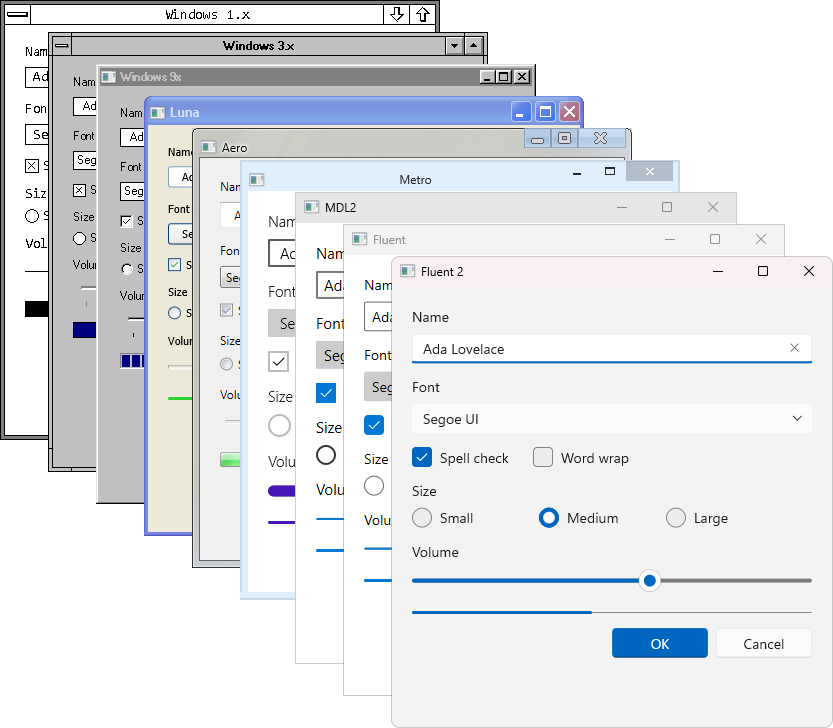
- The controls follow Windows 11's Fluent design, with its parts, states, metrics and keyboard rules, plus Mica, light and dark mode and the system accent color. Theme packs for older Windows eras are included as well.
- Native Win32 controls, e.g. a rich edit box, can be hosted inside the tree when you need them.
What You Can Do With It
-
Your First Window
A window, two buttons and a counter, from
main()to a running app. -
An App Skeleton
A title bar with a search box, a navigation pane with pages and a tab strip of documents.
-
Large Data
Lists that realize a screenful of rows, no matter if the model holds a hundred items or a hundred thousand.
-
Theme Eras
Fluent 2 by default, and the same controls drawn the way Windows 3.x, 9x, Luna, Aero and Metro did it.
-
Extending the Tree
Write your own element, host a native Win32 control or mix hand-built subtrees into a declared one.
-
Testing Without a Window
Controls emit render commands, so you can test layout, input and drawing without an
HWNDor a GPU.
What You Need
- A C++23 compiler: MSVC 19.3x, Clang 16+ or GCC 14+.
- CMake 3.21 or newer. The library builds as a static library by default.
- Windows 10, version 1703 or newer, to run the result.
- Nothing else on the target machine.
Where to Go Next
- Reference: every spec, control and type, generated from the headers.
- Contributing: building the library, how it works inside and where to hook in.
- Background: the history of Windows UI, the theme eras and the studies behind the design.
- The library is MIT licensed, see the
LICENSEfile in the repository.