Windows 9x
Windows 95, 98, Me, NT 4.0 and 2000, 1995 to 2001; Win32, USER32/GDI32 and COMCTL32 v4/v5.
This is the gray, beveled design language Windows 95 introduced and Windows XP's Luna replaced: flat fills, two-pixel raised and sunken edges drawn from a small system-color ramp, square corners everywhere, MS Sans Serif (later Tahoma), and a dotted focus rectangle. One design language across five OS releases. No first-party document of the time gives it a name. "Windows Classic" is the label Windows XP gave it after the fact, and "Windows 9x" is used here as a filing convenience, not as a period term.
How Sure the Numbers Are
This page ranks its evidence in tiers and says which tier a value comes from where it matters.
Tier 1 is the shipped implementation. Genuine Windows 95 (OSR2.5), Windows 98 SE and Windows 2000 installation media supplies every default color on this page, read out of the OS's own setup files.5 No era system was booted, so anything that needs observation (how a hot-tracked push button looked, animation timing) stays open.
Tier 2 is the written specification: the 1995/96 and 1999 design guidelines, the Windows 2000 Application Specification and the printed Win32 Developer's Reference Library.
Tier 3 is reimplementations that encode values, mainly ReactOS (Wine lineage). They are used for geometry the specifications describe but never number, and are marked as such.
Tier 4, a screenshot-eyeballed demake, is quarantined and never cited for a value.
Principles
Unlike several later eras, this one states its own principles, and states them twice. Chapter 2 of both the 1995/96 guidelines and the 1999 Microsoft Windows User Experience, "Design Principles and Methodology", carries the same seven principles in the same order.12 The Windows 95 team behind them was a twelve-person interdisciplinary group formed in October 1992 that tested iteratively in a usability lab, so the list is not rationale written after the fact.10
| Principle | What it means for a control |
|---|---|
| User in Control | The user starts actions, and software reflects the user's own system settings ("colors, fonts, or other options") rather than fixing its own. This is the design-level reason every border is named by a COLOR_* slot and never by an RGB value. |
| Directness | Direct manipulation over command syntax, recognition over recall, metaphor as a bridge rather than a goal. |
| Consistency | Within an application, with the platform and with the chosen metaphor. The 1999 book calls it "the primary goal of this book". |
| Forgiveness | Discovery through interaction, reversible actions, slips and wrong choices treated as design failures to accommodate. |
| Feedback | Every action gets a response, and the response tells you what kind of action happened. |
| Aesthetics | Visual design in service of the task. Chapter 14 "Visual Design" is where this becomes concrete. |
| Simplicity | "Simplicity is not the same as being simplistic." A small extension that complicates the common case is a regression. |
Those principles turn into a very small visual grammar:
- A named color ramp, never literals. Every border comes from five slots
(
COLOR_BTNHIGHLIGHT,COLOR_3DLIGHT,COLOR_BTNFACE,COLOR_BTNSHADOW,COLOR_3DDKSHADOW) so the user can recolor the whole system from the Appearance tab. An application painting a literal RGB broke the first principle, not just a style rule. - One fixed light source. "The light source in Windows comes from the upper left" (1999, p. 409). Raised and sunken are the same color pair with top/left and bottom/right exchanged.
- Layout in dialog units, not pixels, so dialogs scale with the system font. Toolbars are the one named exception and are measured in pixels.
- Words over motion. The Writing Style section is thorough (a capitalization system, a title bar table, terminology rules), while the Animation section holds exactly one number.
What the era deliberately is not:
- No material. No glass, blur or translucency; every surface is an opaque
COLOR_*fill. - No elevation and no shadow. Depth is bevel direction and z-order, nothing else.
- No rounded corners. Not even the rounded push button Windows 3.x had.
- No accent color. Selection is
COLOR_HIGHLIGHT, one ordinary slot in a scheme the user picks wholesale. The active caption color is the closest thing to a "personality" color, but no source says it was meant as an accent.
Foundations
Color
The system color model is a flat array of COLOR_* slots, and winuser.h dates each generation
with its own WINVER guard.8
| Indices | Guard | Arrives with | Slots |
|---|---|---|---|
| 0 to 20 | none | before Windows 95 | COLOR_SCROLLBAR to COLOR_BTNHIGHLIGHT |
| 21 to 24 | WINVER >= 0x0400 |
Windows 95 / NT 4.0 | COLOR_3DDKSHADOW, COLOR_3DLIGHT, COLOR_INFOTEXT, COLOR_INFOBK |
| 25 | no #define |
Windows 98 | unnamed; the registry calls it ButtonAlternateFace (#B5B5B5) |
| 26 to 28 | WINVER >= 0x0500 |
Windows 98 / 2000 | COLOR_HOTLIGHT, COLOR_GRADIENTACTIVECAPTION, COLOR_GRADIENTINACTIVECAPTION |
| 29 to 30 | WINVER >= 0x0501 |
Windows XP, not this era | COLOR_MENUHILIGHT, COLOR_MENUBAR |
The two slots Windows 95 adds, 3DLIGHT and 3DDKSHADOW, are exactly the two extra ramp stops that
turn Windows 3.x's three button colors into this era's five-stop bevel. The ramp and its API
arrive together.
The Default Palette: Two Rows, Not One
The guidelines define every border by slot name and deliberately state no default, and no
Resource Kit, SDK or reference volume prints one either. The installation media does. Windows 9x
seeds a new profile from a REG_BINARY scheme blob inside shell2.inf, Windows 2000 from plain
decimal text in HIVEDEF.INF, and both name the scheme "Windows Standard", the same name the
Resource Kits use.56
Windows 98 SE is byte-identical to Windows 95 on every slot Windows 95 has. Windows 2000 is the only release that moves anything, and it moves as a unit:
| Slot | Windows 95 / 98 SE | Windows 2000 |
|---|---|---|
BTNHIGHLIGHT (lightest) |
#FFFFFF |
#FFFFFF |
3DLIGHT |
#DFDFDF |
#D4D0C8 (equals the face) |
BTNFACE, MENU, SCROLLBAR, borders |
#C0C0C0 |
#D4D0C8 |
BTNSHADOW, GRAYTEXT |
#808080 |
#808080 |
3DDKSHADOW (darkest) |
#000000 |
#404040 |
WINDOWFRAME |
#000000 |
#000000 |
WINDOW (field interior) |
#FFFFFF |
#FFFFFF |
WINDOWTEXT, BTNTEXT, MENUTEXT |
#000000 |
#000000 |
HIGHLIGHT (selection) |
#000080 |
#0A246A |
ACTIVECAPTION |
#000080 |
#0A246A |
GRADIENTACTIVECAPTION |
absent on 95, #000080 (inert) on 98 |
#A6CAF0 (a real gradient) |
INACTIVECAPTION |
#808080 |
#808080 |
GRADIENTINACTIVECAPTION |
absent on 95, #808080 on 98 |
#C0C0C0 |
BACKGROUND (desktop) |
#008080 teal |
#3A6EA5 blue-gray |
INFOBK (tooltip) |
#FFFFE1 |
#FFFFE1 |
HOTLIGHT (links) |
absent on 95, #0000FF on 98 |
#000080 |
Three things follow from this table:
- A theme has to pick one row. Pairing Windows 2000's
#D4D0C8face with Windows 95's navy selection reproduces no released version. There is no third row to compromise toward. - The Windows 2000 ramp cannot be computed from its face.
3DLIGHTequals the face there, and no lighten function returns its input. The ramp is flattened at the light end and softened at the dark end, and both are editorial choices, so a Windows 2000 palette has to be literal data. #C0C0C0survives on Windows 2000, but as the inactive caption gradient end, not the face. That is the trap to avoid when generalizing a familiar gray back to "the Windows 95 button".
No Windows Me media was examined, so which row Windows Me belongs to is open. The named alternate schemes (Brick, Maple, Spruce, Teal and the rest) sit in the same setup file as further blobs but were not decoded for this page.
High Contrast
High contrast in this era is not a separate rendering path. It is a scheme category built from the same slots, switched on from Accessibility Options, and the Windows 98 Resource Kit counts 27 such schemes.6 An application that already reads every color from a slot supports it for free, and the 1999 guidelines add one duty on top: while High Contrast is set, hide any image drawn behind text.1 The Windows 2000 Application Specification made both into logo requirements: 5.1 "Support standard system size, color, font, & input settings" and 5.2 "Ensure compatibility with the High Contrast option".7
Typography
| Surface | Windows 95 / 98 / NT 4.0 | Windows 2000 |
|---|---|---|
| Dialogs, controls, menus, status text | MS Sans Serif 8 pt | Tahoma 8 pt for the OS's own chrome |
| Title bars | the same face, bold | the same face, bold |
| Chrome glyphs (caption buttons, scroll arrows, size grip, check and radio parts) | Marlett | Marlett |
| Wizard 97 exterior page titles | Verdana Bold 12 pt | Verdana Bold 12 pt |
The 1999 guidelines state the succession in one sentence (p. 430): MS Sans Serif 8 pt is the
default on Windows 98 and NT 4.0, Tahoma 8 pt is recommended for Windows 2000 but "not set by
default in Windows 2000; you must explicitly select it", while Windows 2000 itself uses Tahoma for
most of its own interface.1 An application that did nothing got MS Sans Serif on Windows 2000
too. Both faces are reached through the same indirection (DEFAULT_GUI_FONT, the MS Shell Dlg
logical name), so an application written once picked up the platform's choice.
Bold is for title bars only: "Except for title bars, avoid using bold or italic for interface text. In menus, bold text implies that the command is a default action" (p. 431). There is no type ramp beyond 8 pt UI text and the one 12 pt wizard title.
Marlett draws chrome as font glyphs requested at the target rect's own pixel height, which is what makes classic chrome resolution-independent:9
| Chrome | Marlett characters |
|---|---|
| Close / Help / Minimize / Maximize / Restore | r s 0 1 2 |
| Scroll arrows left / right / up / down | 3 4 5 6 |
| Size grip (normal / flat) | o p / x y |
| Check box frame, then center | c d e f, center g |
| Check mark | b |
| Radio frame, then center | j k l m, center n |
| Radio dot | i |
| Menu cascade arrow, check, bullet | 8, a, h |
Metrics
The Edge Grammar
This is the center of the era. There is no z-axis; there are four single-pixel border primitives,
stated with an identical table in both guideline editions and implemented by DrawEdge:13
| Primitive | Top/left | Bottom/right |
|---|---|---|
| Raised outer | BTNFACE |
WINDOWFRAME |
| Raised inner | BTNHIGHLIGHT |
BTNSHADOW |
| Sunken outer | BTNSHADOW |
BTNHIGHLIGHT |
| Sunken inner | WINDOWFRAME |
BTNFACE |
Every named style is one primitive or two stacked:
| Composite | Built from | Used by |
|---|---|---|
| Window border | raised outer + raised inner | window and menu borders, scroll arrows |
| Button border, up | raised outer + raised inner, with the top/left colors swapped between the rings | command buttons |
| Button border, down | sunken outer + sunken inner, same swap | pressed command buttons |
| Field border | sunken outer + sunken inner | text boxes, list boxes, combo boxes, check-box wells, the work area |
| Status field | sunken outer only | status bar panes, read-only dynamic fields |
Grouping border (EDGE_ETCHED) |
sunken outer + raised inner | group boxes, etched separators |
| Toolbar button, hot | raised inner only | flat toolbar buttons under the pointer |
| Toolbar button, down | shadow top/left, highlight bottom/right | pressed flat toolbar buttons |
DrawEdge spells the combinations as EDGE_RAISED, EDGE_SUNKEN, EDGE_ETCHED and EDGE_BUMP,
plus BF_* flags for which sides draw, whether to fill (BF_MIDDLE), whether to shrink the rect
past the edge (BF_ADJUST) and BF_SOFT. DrawFrameControl draws whole controls (DFC_BUTTON,
DFC_CAPTION, DFC_MENU, DFC_SCROLL); DFCS_HOT and DFCS_TRANSPARENT are marked Windows 98 and
2000 only.3
A command button is EDGE_RAISED with BF_SOFT, which is a different four-color arrangement from a
plain raised window border. ReactOS's lookup tables (Tier 3) give both:9
| Ring | Window border (EDGE_RAISED) |
Command button (EDGE_RAISED with BF_SOFT) |
|---|---|---|
| Outer top/left | 3DLIGHT |
BTNHIGHLIGHT |
| Inner top/left | BTNHIGHLIGHT |
3DLIGHT |
| Inner bottom/right | BTNSHADOW |
BTNSHADOW |
| Outer bottom/right | 3DDKSHADOW |
3DDKSHADOW |
Two raised shapes, not one, is the most common way to get this era subtly wrong: draw group boxes with the button arrangement and they read like buttons, draw buttons with the window arrangement and they read flat.
The 1999 prose and the ReactOS table disagree about one edge of the button, and it is a different
edge in each half of the era. The prose puts BTNFACE on the inner top/left ring and WINDOWFRAME
on the outer bottom/right. On Windows 95/98 that makes the inner light ring #C0C0C0 where the
table paints #DFDFDF; on Windows 2000 the inner ring agrees (both #D4D0C8) but the outer dark
ring does not (#000000 against #404040). The ReactOS table is Windows 2000-era code, and the
disagreement vanishes exactly where that palette collapses, which suggests the table encodes a
Windows 2000 coincidence. That reading is an inference; no Windows 95 USER32 was disassembled.
The rects matter as much as the colors. In IntDrawRectEdge the outer ring runs each edge end to
end and is drawn top, left, bottom, right, so on a raised button the top-right and bottom-left
corner pixels are 3DDKSHADOW. The inner ring is pulled back one pixel at every corner the outer
ring owns. Draw all eight lines full span and you get a one-pixel spur at each corner of every
button in the UI.
A pressed command button draws the same rings mirrored and moves its label one pixel right and one
down (1999, p. 424, "Pressed Appearance"). DFCS_ADJUSTRECT gives back a content rect inset 2 px
per side.
Field Interiors
The 1999 guidelines fill most fields with button highlight and text fields with button face when
read-only or disabled (p. 421). ReactOS's check-box and radio code fills with COLOR_WINDOW normally
and COLOR_BTNFACE when inactive or pushed. Under every default palette BTNHIGHLIGHT and WINDOW
are both white, so the difference only shows once a user scheme tints the window color.
Dialog Units
Layout is in dialog units: one horizontal DLU is a quarter of the average character width of the current system font, one vertical DLU an eighth of its height.1
| Control | Height (DLU) | Width (DLU) |
|---|---|---|
| Command button | 14 | 50 |
| Most single-line controls (default) | 14 | as needed |
| Check box, radio button | 10 | as needed |
| Drop-down combo / list box | 10 / 14 | match other fields |
| Text box | 14, plus 8 per extra line | match other fields |
| Text label | 8 per line | as needed |
| Dialog or property sheet, maximum | 263 | 263 (at 640 x 480) |
| Property sheet page, minimum | 114 | 212 |
| Wizard 97 exterior / interior page | 193 / 143 | 317 |
| Spacing | DLU |
|---|---|
| Dialog margins, unrelated controls, paragraphs | 7 |
| Related controls, buttons in a row | 4 |
| Label to its control | 3 |
| First control in a group box, from the top | 11 |
| Smallest gap between controls | 2 |
Toolbars are the exception and are measured in pixels, and the numbers changed inside the era:
| Edition | Small button | Large button | Small image | Large image |
|---|---|---|---|---|
| 1995/96 | 24 x 22 | 32 x 30 | 16 x 16 | 24 x 24 |
| 1999 | 21 high (22 wide image-only) | 26 high (28 wide image-only) | 16 x 16 | 20 x 20 |
The DLU system, the OK-before-Cancel rule and the dialog ceiling are layout and behavior rather than colors and edges, so a theme alone cannot supply them. They are what makes an application written in period style read as 1997 rather than as a modern dialog repainted gray.
Materials, Focus and States
- Materials: none. The only semi-transparent effect is a 50% checkerboard dither of two solid colors, used for an option-set toolbar button and a mixed-value check box, and becoming a true halftone on displays with 256 colors or more. The single mention of real alpha blending in the 1999 visual design chapter is Windows 2000's drag image, not chrome.
- Focus:
DrawFocusRectis aPatBltwithPATINVERTof a 50% gray dither brush, four strips whose thickness comes fromSPI_GETFOCUSBORDERWIDTH/HEIGHT. The "dots" come from the dither meeting XOR, not from a dash pattern, which is why the indicator works under every scheme without a color. Windows 2000 added hiding focus rectangles and access-key underlines until the keyboard is used (WM_CHANGEUISTATE,UISF_HIDEFOCUS,UISF_HIDEACCEL). - States: pressed, option-set, mixed-value, unavailable, input focus, hot-tracked and flat.
An unavailable label is engraved: drawn once in
BTNHIGHLIGHT, then again at a one-pixel offset inBTNSHADOW(DrawStatewithDSS_DISABLED). An unavailable check mark or radio dot is not engraved; it is drawn flat inBTNSHADOW. Hot-tracking is documented for toolbar and menu-bar buttons only.
Motion
There is essentially none. The whole Animation section of both editions holds one number: fluid
animation needs 16 frames per second or more, a floor rather than a duration. No transition
duration or easing curve is stated anywhere for this era. AnimateWindow exists by Windows 2000
and comctl32 5.80 documents a sliding tooltip animation (TTS_NOANIMATE turns it off), but no
source gives either a length. Zero is the era-correct value for every control state change.
Controls
Push Button
| Property | Value |
|---|---|
| Recommended size | 50 x 14 DLU |
| Edge at rest | EDGE_RAISED with BF_SOFT: BTNHIGHLIGHT outer and 3DLIGHT inner top/left, 3DDKSHADOW outer and BTNSHADOW inner bottom/right |
| Face | BTNFACE, filled by the same call (BF_MIDDLE) |
| Content rect | inset 2 px per side |
| Pressed | rings mirrored, label +1, +1 |
| Hover | none on a dialog push button |
| Focus | dotted rectangle inside the bevel, no separate focused edge |
Default (BS_DEFPUSHBUTTON) |
a "heavy black border" added outside; no source states its width |
| Disabled | engraved label, edge unchanged |
The 1999 guidelines list exactly five appearances: normal, pressed, input focus, default and
unavailable, and they compose. DFCS_HOT is legal on push buttons from Windows 98, but ReactOS's
push-button path accepts it without branching on it, and whether the real USER32 drew anything
different is not established. Only one button per window is the default, and the default moves to
whichever push button has focus. OK comes first, then Cancel, then everything else, and OK and
Cancel get no access key because Enter and Esc already reach them.
Toolbar Button
TBSTYLE_FLAT arrives with comctl32 4.70 (Internet Explorer 3). A flat toolbar button draws no
border or fill at rest, gains the raised inner edge alone under the pointer, and shows the mirrored
single edge when pressed. An option-set (checked) toolbar button sits on the face/highlight
checkerboard. The exact colors COMCTL32 picked for the hot state were never documented.
Check Box and Radio Button
| Property | Value |
|---|---|
| Height | 10 DLU |
| Well | a sunken field: BTNSHADOW/BTNHIGHLIGHT outer, 3DDKSHADOW/3DLIGHT inner |
| Interior | COLOR_WINDOW; COLOR_BTNFACE when pressed or disabled |
| Mark | Marlett b (check) or i (dot) in WINDOWTEXT; BTNSHADOW when disabled |
| Mixed value | the mark in BTNSHADOW over a BTNFACE/BTNHIGHLIGHT checkerboard |
| Flat (inside a list box) | all four edge strokes collapse to WINDOWFRAME |
The whole indicator is five stacked Marlett glyphs colored with the same four-slot ramp as every
other bevel, sized to the shorter side of the control rect. There is no toggle switch in this era.
The only binary control is the check box, optionally drawn BS_PUSHLIKE as a latching button that
is raised when off and sunken when on.
Text Field and Combo Box
Every field is the sunken field border around a COLOR_WINDOW interior, with a blinking caret as
its only focus cue. The edge does not change on focus. A combo box is an edit field with a raised
push button inside its right edge, as wide as a scroll-bar arrow (SM_CXVSCROLL, 16 px at 96 DPI),
carrying the DFCS_SCROLLCOMBOBOX triangle. Its drop-down is a list box inside a 1 px WINDOWFRAME
border, selected row in HIGHLIGHT.
Group Box and Separators
A group box is a BUTTON-class control drawing the grouping border (EDGE_ETCHED) with its label
breaking the top edge at the upper left. It groups nothing by itself; WS_GROUP does. Etched
separators are static controls with SS_ETCHEDHORZ/SS_ETCHEDVERT, the same edge on two sides.
libwinui's GroupBox draws it as USER32 does: the etched frame with its top one pixel above the
label's middle, the label 7 px in over a 1 px gap either side, and the content inset by the
guidelines' 11 DLU from the top and 7 DLU from the bottom, aligned under the label.
Scroll Bar
SM_CXVSCROLL is 16. The arrows and the scroll box are DrawFrameControl's raised buttons; a held
arrow is drawn flat in a 3DSHADOW frame with the glyph nudged one pixel, and a disabled one
embossed. The shaft is what CTLCOLOR_SCROLLBAR hands out: a 50 % dither of 3DHILIGHT and
3DFACE while 3DHILIGHT equals WINDOW, so it never matches the page, else flat
COLOR_SCROLLBAR. A held page click inverts its half of the shaft. libwinui draws this bar in a
gutter of its own under Windows 9x, with the proportional thumb no shorter than 8 px, and under
the classic high contrast themes.
Trackbar (Slider)
TRACKBAR_CLASS ships in the original Windows 95 comctl32. The specifications document it only
behaviorally and say its rects are queryable rather than fixed, so the geometry below is Tier 3,
recovered from comctl32's Wine/ReactOS restatement:9
| Part | Geometry |
|---|---|
| Thumb | 21 px across the track, 11 px along it (forced odd so the point has a center pixel) |
| Point | 5 px deep, a true 45 degrees, growing out of the far end; 16 of the 21 px are flat |
| Thumb edge | EDGE_RAISED with BF_SOFT on three sides, the command-button shape |
| Channel | EDGE_SUNKEN, 4 px thick, so all bevel and no interior; #808080, #000000, #DFDFDF, #FFFFFF on the 95/98 row |
| Channel inset | 8 px short of each end; the thumb travels inside it and never overhangs the control |
| Channel offset | 9 px from the client edge, against the thumb's 2, so it rides one pixel above the thumb's center |
| Ticks | 1 px 3DDKSHADOW, starting 2 px past the point, 3 px long, 4 px for the two end ticks |
| Focus | a dotted rectangle over the whole client rect |
The two end ticks are drawn unconditionally; TBS_AUTOTICKS adds one per unit and TBM_SETTICFREQ
thins them, while "no ticks" is its own style, TBS_NOTICKS. The thumb stays raised in every state.
Disabled and dragging both replace its face with a 50% dither of 3DFACE over 3DHILIGHT, which is
all the feedback the control gives while you drag it. The groove is never filled behind the thumb.
Progress Bar
"A rectangle that is gradually filled with the system highlight color" (Vol. 4, p. 413): the fill
is COLOR_HIGHLIGHT by definition, on a COLOR_BTNFACE well. The base control is segmented;
PBS_SMOOTH and PBS_VERTICAL arrive with comctl32 4.70. There is no indeterminate or marquee
mode in this era at all. Every "marquee" in the era's documents is a rubber-band selection.4
Menus, Tooltips and Status Bar
- Menus are
COLOR_MENUwithCOLOR_HIGHLIGHTbehind the selected item, square, with no shadow. Glyphs are Marlett. - Tooltips are
COLOR_INFOBK#FFFFE1withCOLOR_INFOTEXT, a single line sized to the text, appearing after about half a second of hover. Balloon tooltips (TTS_BALLOON) are comctl32 5.80. - Status bar panes use the status-field border (sunken outer only).
SBT_POPOUTdraws a raised pane instead,SBARS_SIZEGRIPadds the grip.
Reproducing It Today
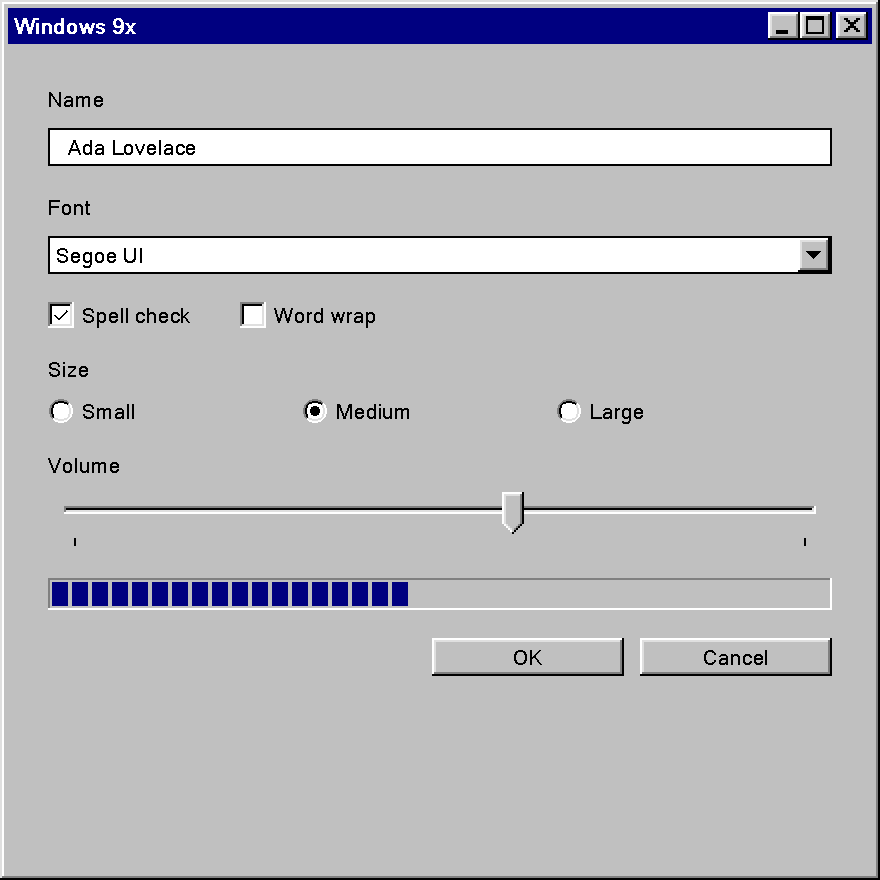
Windows9x theme, in a window opened with Frame::Themed.Very little of this era is artwork. The whole look is a handful of colors in a fixed arrangement, so a re-creation on a current stack (Direct2D and DirectWrite, a DWM-managed window, XAML or any other retained UI layer) can transcribe most of it and has to approximate only a few things.
Exact From the Data Above
| Area | Why it transfers |
|---|---|
| Palette | Both rows are literal first-party values. Keep them as data; the Windows 2000 ramp cannot be computed from its face. |
| Edges | Single-pixel lines on an integer grid, two raised arrangements (window and button), the etched group box and the single-edge status and toolbar variants. Drawn aliased and snapped to device pixels, they come out pixel for pixel, provided the rings nest and the outer ring owns the corners. |
| States | Pressed = mirrored rings plus a +1, +1 content offset; the engraved disabled label is two draws of the same text; the disabled mark is one flat BTNSHADOW draw. |
| Dithers | The option-set and mixed-value backgrounds are 50% checkerboards of two slot colors. A 2 x 2 bitmap brush reproduces them; a 50% alpha fill does not, because the checkerboard sparkles at 1:1 and the blend does not. |
| Shape and motion | Square corners, no shadow, no translucency and zero durations are all trivially exact, as long as nothing in the host adds them back. |
| Trackbar | The geometry in the trackbar table is exact, but only to Tier 3: one measured screenshot of a real trackbar would promote it. |
Approximated
- MS Sans Serif. It is a bitmap
.fon, which DirectWrite cannot load. The TrueType Microsoft Sans Serif is the usual stand-in, and the mismatch is metric, not only antialiasing: an outline face at 8 pt puts its stems and sidebearings elsewhere than a hand-hinted bitmap strike, so line breaks and control widths drift even with aliased text. Tahoma, the Windows 2000 face, is a TrueType font that still ships, so a re-creation of the Windows 2000 row has no font gap at all. - Marlett and the toolbar bitmaps. They are the only Microsoft artwork in the chrome, and
neither should be redistributed. Marlett's silhouettes (a chevron, a tick, a dot, a hatched
grip) are simple and were designed to scale, so original vector glyphs in the same shapes are
the clean default. Current Windows may still carry
marlett.ttfwithout registering it as a font, so enumeration does not find it; loading the user's own copy is an option, not a guarantee. Toolbar images have to be authored fresh at 16 x 16 and 20 x 20. - The focus rectangle.
DrawFocusRectXORs a dither brush onto whatever is underneath, and Direct2D's ordinary drawing path has no raster operation. A 1 px checkerboard strip in a fixed color pair per palette matches it over flat faces, which is nearly everywhere, and differs over anything non-uniform. - The button's inner light ring. The 1999 prose and the ReactOS table disagree on one edge (see the edge grammar). Either is defensible; a re-creation has to pick one and cannot cite the era for its choice.
- A user-defined scheme's ramp. Deriving the five stops from a single face color gives a ramp in the Windows 95 manner, never Windows 2000's flattened one. Call it that rather than "the classic ramp".
- Unmeasured details. The width of the default push button's "heavy black border", whether a
hot-tracked push button looked any different, and
BF_SOFT's pixel geometry beyond the color swap are all unsourced. Any value chosen for them is an implementer's decision. - Controls the era never had. A toggle switch, an indeterminate progress bar or a severity-colored message bar has no counterpart. The honest re-creation builds them from the era's grammar (a latching button raised when off and sunken when on, for instance) and says so, since the era also has no semantic color slots to borrow.
Window Chrome
By default the title bar, frame and system menu belong to the OS. On Windows 11 DWM rounds the
corners, casts a shadow and may apply Mica, all three foreign to this era. DWM can be asked for
square corners and for caption and border colors, which gets the Windows 95/98 caption (a flat
#000080) close.
A libwinui window opened with Frame::Themed gets the whole frame from the pack instead. The
caption takes the scheme's own colors, decoded from the scheme data the two releases ship,
including Windows 2000's #0A246A to #A6CAF0 gradient. The 16 x 14 caption buttons are
beveled, and the frame is the raised 4 px one. High Contrast Black gets its purple and green
captions, its yellow border and its larger buttons. The corners stay square and the shadow stays
DWM's.
The same applies inside the window: a modern framework rounds and shadows its popups by default, and the era has neither.
Not a Theme's Job
Some of what makes this era recognizable is behavior, layout or content, so no color or edge setting can supply it:
- the dialog-unit layout, the 50 x 14 DLU button and the 263 x 263 DLU dialog ceiling;
- OK before Cancel, Help last, no access key on OK or Cancel, one default button that follows focus;
- hiding focus rectangles and access-key underlines until the keyboard is used (Windows 2000);
- the tooltip's half-second delay;
- the toolbar icon grid, MDI, Explorer, the Start menu and the taskbar.
An application written in period style needs these as well as the colors.
High Contrast Today
In this era high contrast is a color scheme, not a rendering mode. A Windows 95 user in a
high-contrast scheme still had beveled buttons, drawn with the same four-slot construction in
the scheme's colors, and the XOR focus rectangle stays visible under any scheme because it
carries no color of its own. An application's duties were to read every color from a slot, to
check SPI_GETHIGHCONTRAST, and to hide images drawn behind text while it is set.17
A re-creation that follows a current Windows contrast theme has less to work with: those themes are defined by a handful of colors (text, background, button text and face, selected text and its background, hyperlinks, disabled text), none of which is a bevel stop. The light and dark rings have to be derived from the text and face colors, and they should stay visible on any face the user picks.
Sources
-
Microsoft Corporation, Microsoft Windows User Experience, Microsoft Press, 1999. Chapter 2 "Design Principles and Methodology" (pp. 25 to 38), chapter 14 "Visual Design" (pp. 409 to 476: Basic Border Styles p. 417, field interiors p. 421, visual states pp. 423 to 429, font and size p. 430, dialog units pp. 448 to 457, animation p. 475), chapter 15 accessibility (pp. 479 to 493). ↩↩↩↩↩↩
-
Microsoft Corporation, The Windows Interface Guidelines for Software Design, Microsoft Press, 1995. Cited from its February 1995 pre-release, published on microsoft.com as The Windows Interface Guidelines: A Guide for Designing Software (chapter 13 "Visual Design", Basic Border Styles p. 300), and from the post-ship web edition of 3 July 1996. ↩
-
Microsoft Win32 Developer's Reference Library, Volume 3 "GDI", Microsoft Press, 2000, pp. 514 to 522 (
DrawCaption,DrawEdge,DrawFocusRect,DrawFrameControl,DrawState). ↩↩ -
Microsoft Win32 Developer's Reference Library, Volume 4 "Common Controls", Microsoft Press, 2000: Progress Bar (pp. 413 to 418), Property Sheets (pp. 427 to 429), Tooltips (pp. 649 to 665), Trackbar (pp. 697 to 699), Wizard 97 (pp. 165 to 170). Volume 2 "User Interface" covers the
BUTTON,STATICand scroll-bar styles. ↩ -
Windows 95 OSR 2.5 (4.03.1216) and Windows 98 SE installation media,
shell2.inf, theWindows Standardscheme blob in[schemes.reg]; Windows 2000 Professional SP4 installation media,HIVEDEF.INF, theControl Panel\Colorsblock. ↩↩ -
Microsoft Windows 95 Resource Kit, Microsoft Press, 1995, chapter 22, p. 751, and Microsoft Windows 98 Resource Kit, Microsoft Press, 1998 (the "Windows Standard" scheme name and the count of 27 high-contrast schemes). ↩↩
-
Application Specification for Microsoft Windows 2000 for Desktop Applications, v1.0a, 21 January 2000, chapter 5 "User Interface Fundamentals", https://learn.microsoft.com/en-us/previous-versions/ms995861(v=msdn.10). ↩↩
-
WINUSER.Hfrom the 1996 Win32 SDK for Windows NT 4.0 and Windows 95 and from the April 1999 Platform SDK, andwinuser.hfrom Windows SDK 10.0.26100: theCOLOR_*table and itsWINVERguards. ↩ -
ReactOS, reactos/reactos at commit
023d8af5566:win32ss/user/user32/windows/draw.c(IntDrawRectEdge, theLTInner*/LTOuter*color tables,UITOOLS95_DFC_ButtonPush,UITOOLS95_DFC_ButtonCheckRadio,DrawFocusRect) anddll/win32/comctl32/trackbar.c, both derived from Wine. Tier 3: a reimplementation written to match the shipped behavior, cited for geometry the specifications do not number. ↩↩↩ -
Kent Sullivan, "The Windows 95 User Interface: A Case Study in Usability Engineering", Proceedings of CHI '96, ACM, 1996, pp. 473 to 480. ↩